
Welcome to VPOS Media | Learn, Implement, and Master
Transform your payment operations with VPOS Media. This resource center guides you from basic device setup through advanced system configuration, with organized learning paths for every role and skill level.
General
Welcome to VPOS Media: Your Complete Payment Solution Guide
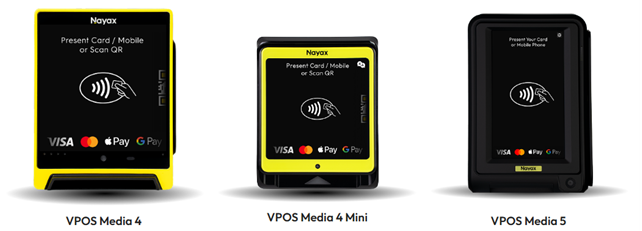
VPOS Media represents Nayax’s advanced payment terminal solution designed for unattended retail environments.
Whether you’re managing vending machines, kiosks, laundromats, or other self-service payment points, VPOS Media provides a versatile, reliable payment acceptance platform that supports multiple payment methods and seamless connectivity.
Check the Release Notes Hub for the latest updates, new features, and firmware releases for the Nayax VPOS Media family.
Foundation Level: Getting Started
Build your essential VPOS Media knowledge. These articles introduce you to the VPOS Media product family, help you understand the device interfaces, and provide quick answers to common questions.
Start here to gain confidence navigating your device and understanding its core capabilities before moving into hands-on configuration.
Overview of VPOS Media Products
Overview of VPOS Media Technician Menu | Devices
Overview of VPOS Media Launcher Menu | Devices
Locate a VPOS Media 4 Device Serial Number | Devices
Implementation Level: Setup & Activation
Get your devices up and running. These step-by-step guides walk you through the complete activation process, from choosing your activation method to establishing connectivity and processing your first transactions.
Follow these procedures to deploy new devices or reconfigure existing ones for optimal performance.
Activate a VPOS Media device on a PC
How to Setup Internet Connectivity on a VPOS Media 4 Device
Pin Code Transactions | VPOS Media 4
Operations Level: Day-to-Day Management
Master routine device maintenance and management. Learn how to collect diagnostic information for support cases, manage access to technical features, and keep your device fleet current with firmware updates.
These operational skills ensure your devices continue performing reliably and securely in production environments.
How to Collect Logs for VPOS Media | Operations
How to Exclude Technician Mode Features for VPOS Media | Operations
VPOS Media Firmware Updates | Terminal Management System for Media
Advanced Level: System Configuration
These guides cover the protocol settings that power your VPOS Media payment workflows. Whether you're setting up a simple vending machine or a complex multi-session EV charger, you'll find the right configuration here.
New to VPOS Media setup? BASIC templates give you a ready-made starting point.
Enter a template tag into the Machine Model field under the General tab in Nayax Core, and the essential settings for your chosen protocol are auto-populated no need to build from scratch.
Choose from the current VPOS Media protocols available in Pulse, MDB, or Marshall based on how your machine communicates and processes transactions. Each guide below provides a side-by-side comparison of available templates so you can see exactly what each one configures and where they differ.
Once your BASIC configuration is in place, use the advanced attributes above to fine-tune settings for your specific setup!
VPOS Media | Machine Protocol Configuration Guides
MDB Configurations
VPOS Media | MDB Basic Configurations
How to Set Up "Start with Card" MDB Level 1 Pre-Selection | VPOS Media
How to Set Up "Start with Card" MDB Level 1 Pre-Authorization | VPOS Media
Pulse Configurations
VPOS Media | Pulse Basic Configuration
Marshall Configurations
All about Marshall Protocols and Configurations
VPOS Media | Marshall Basic Configuration
These resources are continuously evolving based on user feedback, product updates, and emerging best practices. As you work with VPOS Media devices and use these articles, your input helps us improve the content and coverage for everyone.
Did you find this article helpful?