
How to Create a New Product in Classic Core | Administration
Add products to Nayax Core so you can track sales by item, manage inventory, set prices, and run targeted promotions across your machines.
Why Set Up Products?
- Track sales and inventory by individual item
- Set separate pricing for cash, credit card, and prepaid card payments
- Run targeted promotions on specific products
- View product-level data in reports and dashboards
|
BI Module: If you use the BI Module, filling in as much product detail as possible, including Volume Type, Product Cost Price, and Tax, unlocks richer insights for stock management and decision-making. Contact your local distributor for more information about the BI Module. |
Prerequisites
|
Prerequisites
Before you begin, make sure you have:
|
Video Guide
00:00: Setting up specific products in Nayax Core is key for precise tracking, reporting,
00:02: and inventory management.
00:05: It lets you monitor sales by product, adjust pricing, run targeted promotions, and
00:08: much more!
00:12: On the dashboard of your Nayax Classic Core platform,
00:14: click on the Administration tab, then select the Products tab from the drop-down
00:18: menu.
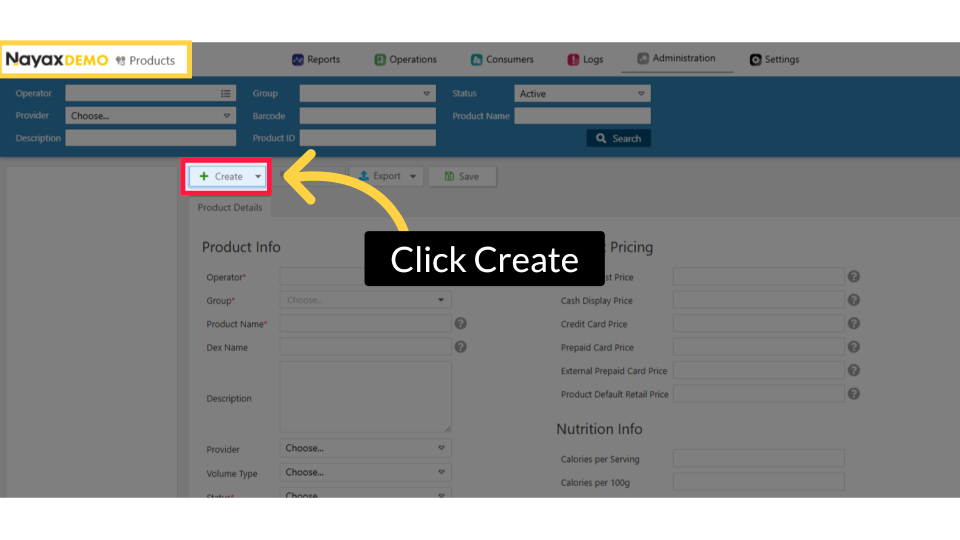
00:20: On the products page, click the Create button.
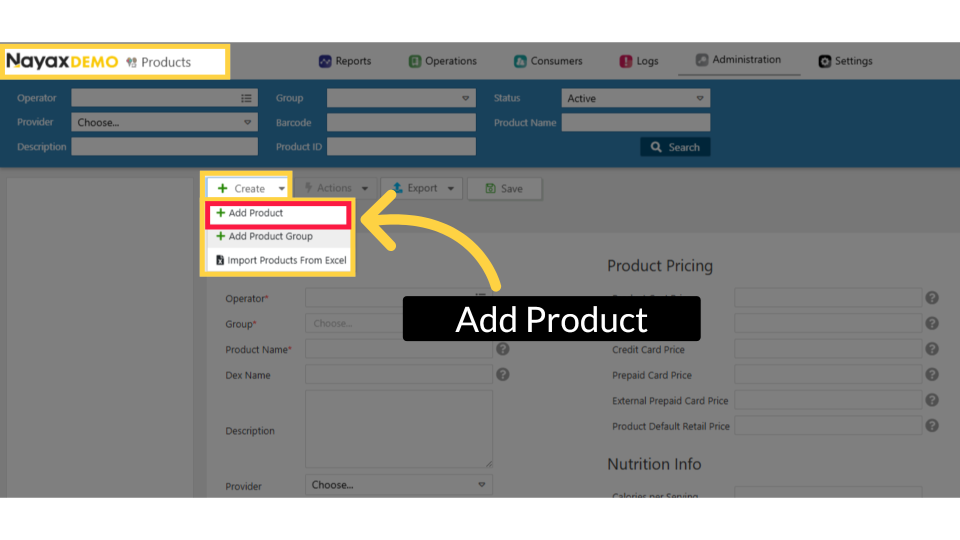
00:23: To create a new product, click Create, then select Add Product from the dropdown.
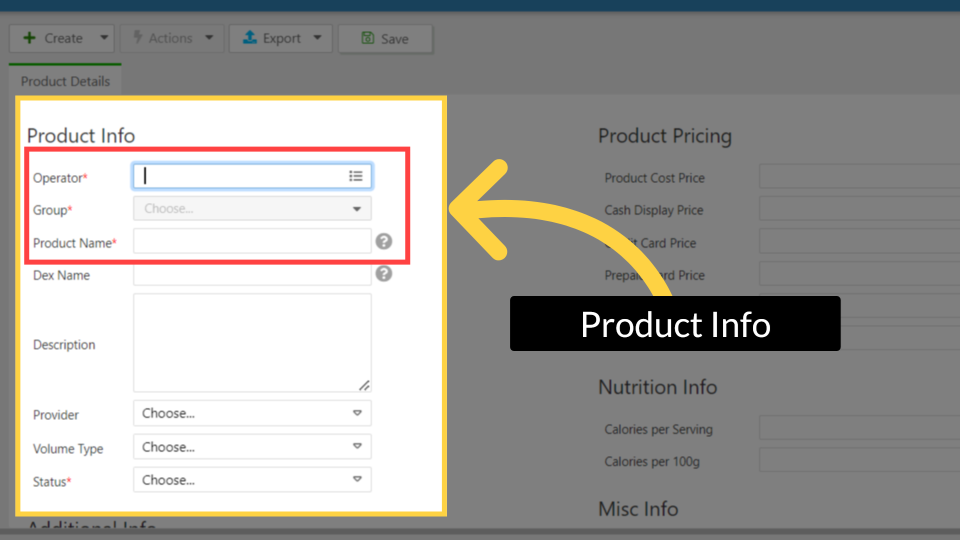
00:28: On the Details page, fill in all required fields marked with an asterisk.
00:31: Under Product Info, select the Operator, choose the Product Group, enter the Product
00:36: Name, and set the Status to Active.
00:38: Click Learn More for the full explanation in Nayax U.
00:42: “In Additional Info, you can optionally add details like barcode, the EAN, and a
00:47: Product Image. Use the 13‑digit EAN, and upload a real product photo
00:52: for the best experience in MoMa, Monyx, and Nova Market. such as a barcode or
00:57: a Product Image, to improve reporting and the customer
01:00: experience. Click Learn More for the full explanation in Nayax U.
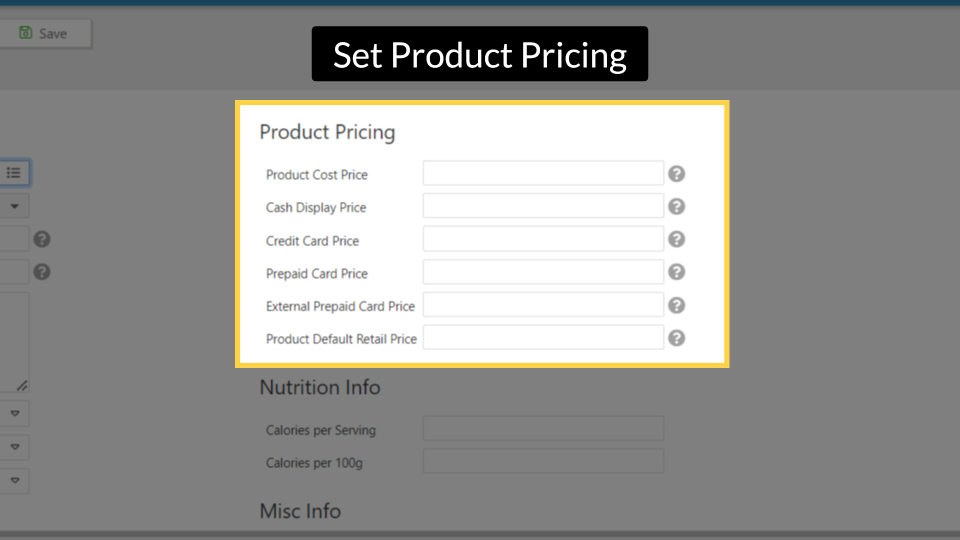
01:05: Complete all fields under Product Pricing.
01:07: If the BI module is enabled, be sure to include the product cost price for
01:11: accurate reporting and insights. Click
01:13: Learn More for the full explanation in Nayax U.
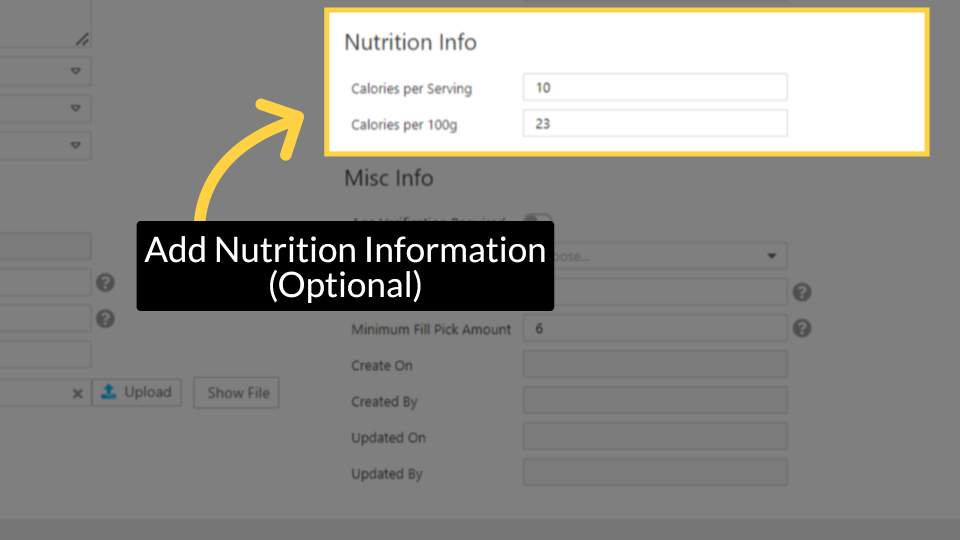
01:17: Add Nutrition Info (optional). Under Nutrition Info, enter Calories per Serving and
01:23: Calories per 100g if available. This
01:25: is recommended for Nova Market. Information is usually on the product packaging.
01:31: “In Misc Info, enter the Tax
01:33: value. This is
01:34: required if you’re using the BI Module. Set the Amount in Tray, and define the
01:39: Minimum Fill Pick
01:39: Amount if needed. Click Learn More for the full explanation in Nayax U.
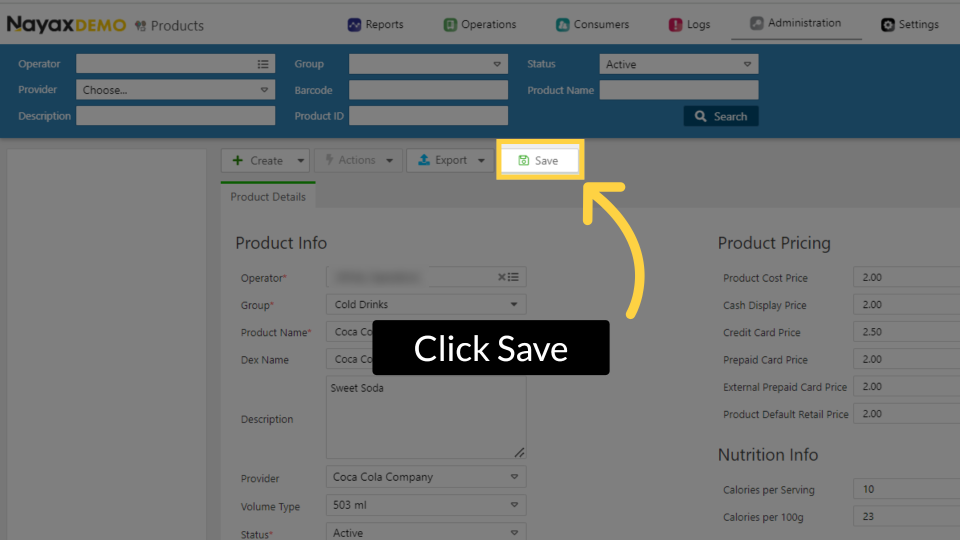
01:44: Don't forget to save your changes by clicking the save button.
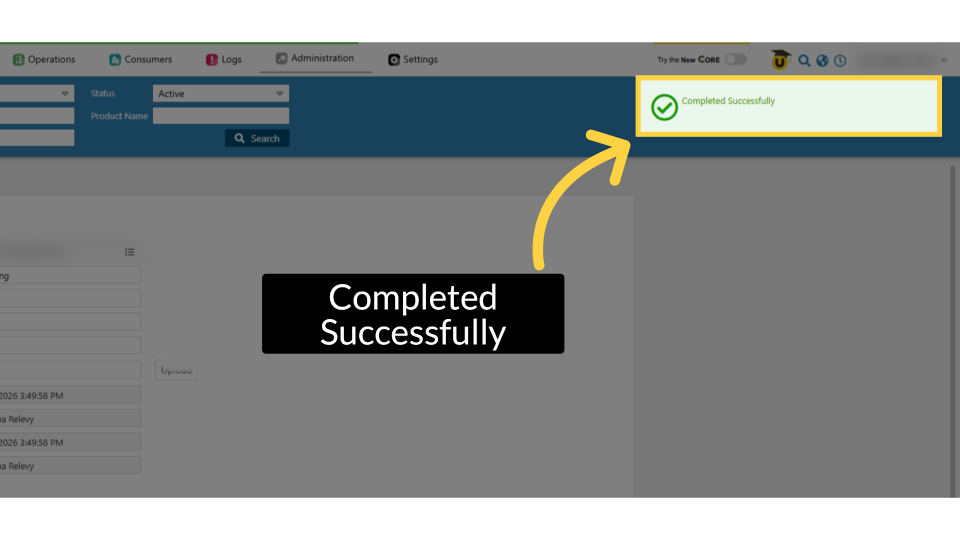
01:48: A 'Completed Successfully' message appears, indicating that your new product has been
01:52: saved.
00:00: Learn how to create a product within NYX core. 00:05: On the dashboard of your NYX core management Suite, click on the administration 00:09: tab. 00:10: Select the products tab from the drop-down menu. 00:13: Click on the create button. 00:15: In the drop-down menu, click on ADD product. 00:18: Fill in the mandatory Fields under product info. 00:21: It is also important to fill in as many details as possible, even if 00:25: the fields are not mandatory, including the volume type. 00:31: Enter the details under product pricing. If you have the bi module enabled, 00:35: be sure to complete all Fields here, including the product cost price to 00:39: fully utilize reporting and insights. 00:42: Another optional feature is to add nutrition information about this 00:46: product. This is highly recommended when using the Nova Market 00:51: Complete additional details in the additional info section. 01:00: Continue adding as many details as possible in the misc info section. 01:05: Once you have filled in all the details, click on the save button. 01:09: A pop-up will be displayed. Confirming, the product was created successfully. 01:14: Thank you for watching.
Click Administration
Image Attached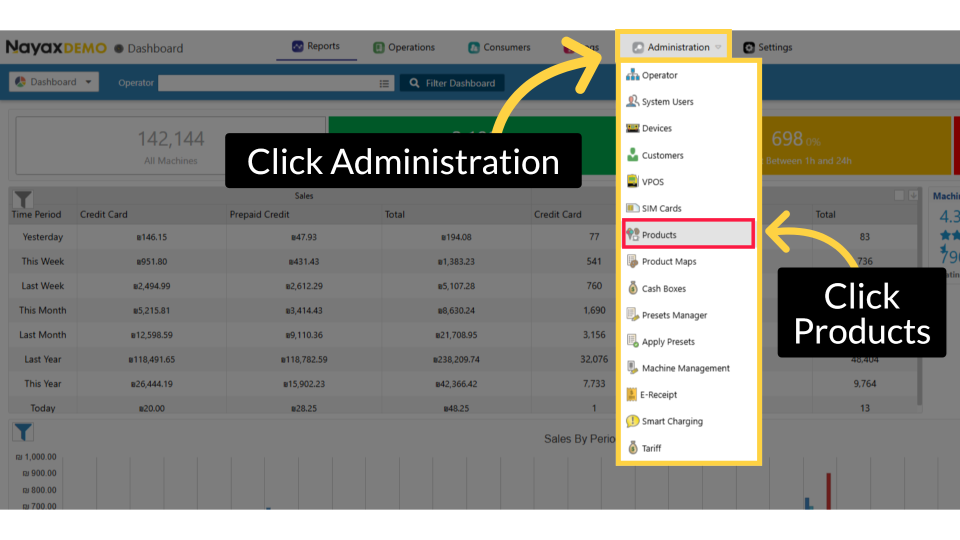
Click Create
Image AttachedOn the products page, click the Create button.
Add New Product
Image AttachedTo create a new product, click Create, then select Add Product from the dropdown.
Product Info
Image AttachedFill in the required product details. Complete the mandatory fields under Product Info:
|
Field |
What to enter |
|
Operator |
Select the operator under which this product will be created |
|
Group |
Select the product group from the dropdown |
|
Product Name |
The display name for this product (up to 100 characters) |
|
Status |
Select Active (recommended) |
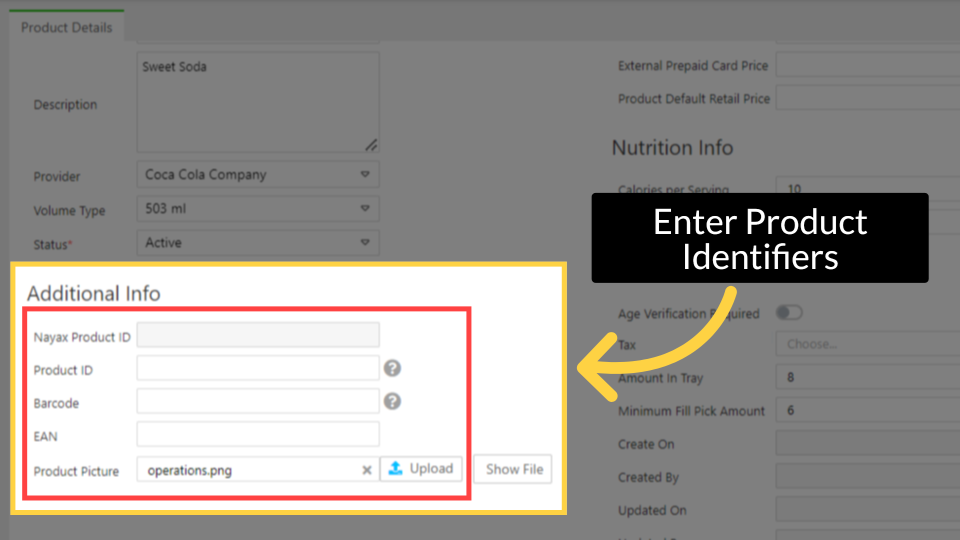
Enter Product Identifiers
Image AttachedAdd optional product details (recommended).
The fields below improve reporting, inventory tracking, and the customer experience:
|
Field |
What to enter |
|
Dex Name |
Product name in DEX files for price and name updates (up to 16 characters). Used with MDB machines. |
|
Description |
Additional information about this product |
|
Provider |
The product supplier (e.g., Coca-Cola Company) |
|
Volume Type |
Product volume or size (e.g., 503 ml). Required if using the BI Module. |
|
Product ID |
Your internal product ID as it appears in reports (up to 100 characters) |
|
Barcode |
Enter or scan the product barcode (up to 100 characters) |
|
EAN |
13-digit European Article Number, if applicable |
|
Product Picture |
Upload a product image or choose from available icons. Visible in MoMa and to customers in Monyx or Nova Market. |
Set Product Pricing
Image AttachedSet product pricing. Under Product Pricing, enter the relevant price fields:
|
Field |
What to enter |
|
Product Cost Price |
The price you (the operator) pay for this product. Required if using the BI Module. |
|
Cash Display Price |
Corrects cash sale notification reports for machines that incorrectly report the cash price |
|
Credit Card Price |
Sets the price for credit card transactions. Overrides the machine price, which does not reflect EVA DTS. |
|
Prepaid Card Price |
Sets the price for Nayax closed-environment prepaid cards. Overrides the machine price, which does not reflect EVA DTS. |
|
External Prepaid Card Price |
Sets the price for external prepaid billing providers (e.g., 10bis, Cibus) |
|
Product Default Retail Price |
The consumer-facing retail price shown in reports |
Note: Entering a price in Credit Card Price or Prepaid Card Price overrides the price set on the machine. For example, if the machine is set to $1.50 but Credit Card Price is $1.75, the product will sell for $1.75. Best practice is to set prices on the machine directly. Use these fields only if the machine is not pricing correctly.
Add Nutrition Information (Optional)
Image AttachedAdd Nutrition Info (optional). Under Nutrition Info, enter Calories per Serving and Calories per 100g if available.
This is recommended for Nova Market, and information is usually on the product packaging.
Configure Misc Info (optional)
Under Misc Info, complete any relevant fields:
|
Field |
What to enter |
|
Age Verification Required |
Toggle on if customers must verify their age to purchase this product |
|
Tax |
Select the applicable tax category. Required if using the BI Module. |
|
Amount in Tray |
Total units per tray package (e.g., 24 cans of soda per tray) |
|
Minimum Fill Pick Amount |
Minimum number of missing units before the product appears on the pick list |
Click Save
Image AttachedClick Save. A Completed Successfully confirmation appears at the top of the screen.
Completed Successfully
Image AttachedA 'Completed Successfully' message appears. The product is now available in your product catalog. You can assign it to machines, include it in promotions, and track its performance in reports. Any product image you uploaded will be visible to you in MoMa and to your customers in Monyx or Nova Market.
Troubleshooting
Troubleshooting
|
Issue |
What to do |
|
Group field is empty or has no options |
A Product Group must exist before you can create a product. Go to Administration > Products, then click Create > Add Product Group. |
|
Product is not appearing in reports |
Check that the product Status is set to Active and that it has been assigned to at least one machine. |
|
Credit Card Price is overriding the machine price unexpectedly |
Clear the Credit Card Price field to allow the machine to control pricing. This field overrides machine pricing whenever it contains a value. |
|
BI Module fields are missing or unavailable |
Contact your distributor to confirm whether the BI Module is enabled for your account. |
Thank you!
Did you find this article helpful?