
How to Set Up "Push to Start" MDB Level 1 Pre-Selection | VPOS Media
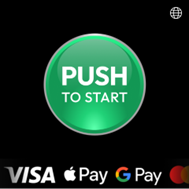
Push to Start adds an animated start button to your VPOS Media 4 idle screen. When a customer taps the button, the device moves to the product selection screen and the transaction begins. This creates a clear, inviting starting point for customers.
Set Up "Push to Start" MDB Level 1 Pre-Selection
Image Attached
This guide walks you through configuring your VPOS Media device to use the Push to Start with Card (Attribute 312) flow.
Device scope: VPOS Media 4 The MDB protocol is available on VPOS Media 4 only. It is not supported on VPOS Media 4 Mini or any other device in the VPOS Media family. Confirm your device model before applying any template in this guide.
In this setup, the transaction begins the moment a customer taps or inserts their card, and product selection happens afterward. This workflow uses MDB Level 1 pre‑selection.
Did you find this article helpful?