
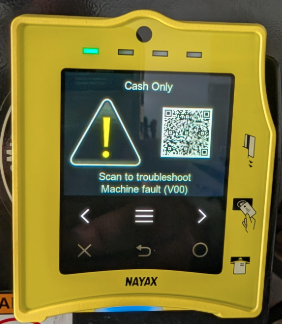
Understanding Cash Only Error Codes: V00, V01 & V02
Identify your Cash Only or Cashless Out of Order error code - V00, V01, or V02 and follow the guide to restore cashless payments via Nayax Core or MoMa.
General
Nayax U › Troubleshooting › Device Management › Understanding Cash Only Error Codes
Understanding Cash Only Error Codes: V00, V01 & V02
Nayax device showing Cash Only or Cashless Out of Order? Identify your error code - V00, V01, or V02 - and go straight to the fix that matches it. Each code has a different root cause, so guessing wastes the time you could spend getting cashless back online.
Not sure which error code you have? Check the screen of your Nayax device. The code (V00, V01, or V02) appears alongside the Cash Only message. If it isn't immediately visible, power-cycle the device and watch the screen on startup.
Prerequisites
Before You Start
- You've checked the device screen and noted the error code showing (V00, V01, or V02).
- You have access to Nayax Core Management Suite or the MoMa mobile app for your operator.
- You know which machine and location this device is on, in case you need to escalate.
Diagnose
Identify Your Code
Expand the card that matches your device screen.
Retrieval Aid
Quick Reference: V00, V01 & V02 at a Glance
| Code | What it means | Primary cause | First fix to try |
|---|---|---|---|
| V00 | No MDB signal from the vending machine to the Nayax device | Wrong or faulty cable; cashless not enabled on VMC board; wrong protocol on device | Check and reseat VMC and MDB cables |
| V01 | MDB connection inactive, waiting for VMC initialization | VMC not completing startup sequence; MDB Flags not set correctly | Set MDB Flags to 06 Ignore + Pre Selection |
| V02 | VMC issued READER DISABLE; cashless payments blocked | Open machine door; service mode active; pending cash credit; board fault | Close door, clear cash credit, restart the machine |
Expectation Setting
What Each Dedicated Guide Covers
-
What the error code means - a plain-language explanation of what's happening between your Nayax device and the vending machine.
-
Known causes - the conditions that typically trigger this error, ordered from most to least likely.
-
Step-by-step troubleshooting - numbered steps with platform options where relevant: Nayax Core Management Suite, MoMa, or the POS device directly.
-
Escalation path - clear guidance on when to contact Nayax Support or your machine manufacturer if self-service steps don't resolve the issue.
Help
Troubleshooting
Escalation
Still Need Help After Troubleshooting?
If you've worked through the guide for your error code and the device is still showing Cash Only, contact Nayax Support.
Have your device serial number, error code, and the steps you've already completed ready to share.
Have your device serial number, error code, and the steps you've already completed ready to share.
Did you find this article helpful?