
How to Complete Your Nayax UK & Ireland Onboarding Agreement
Complete your Nayax UK & Ireland onboarding agreement online in 7 steps, from business details and bank setup to identity verification and digital signing, so your devices can go live.
Video Guide
00:00: In this guide,
00:01: we'll walk you through the Nayax UK online onboarding agreement
00:04: from basic KYC requirements
00:06: to digitally signing your contract.
00:09: Click the 'Learn More' link
00:11: to view a full explanation in Nayax U.
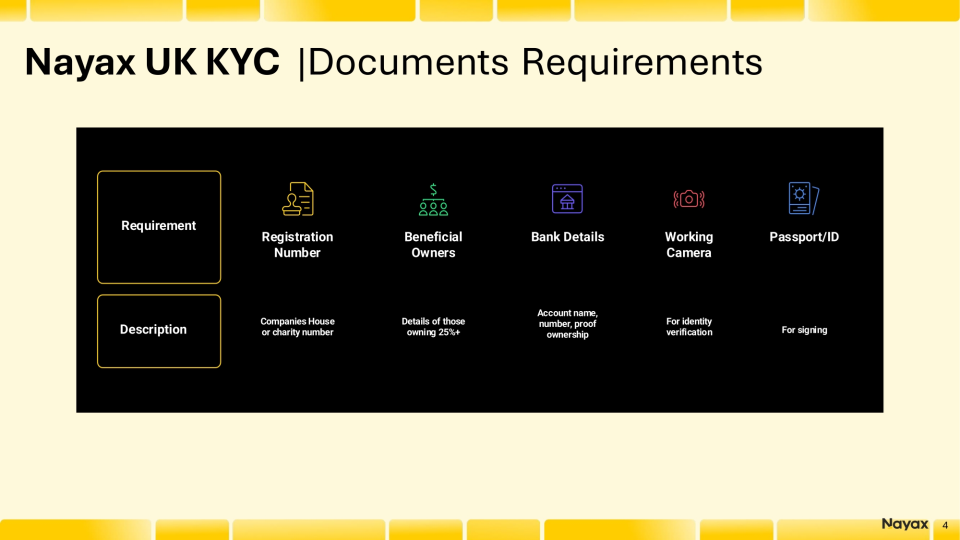
00:14: Before opening the form, ensure you have:
00:16: your Nayax UK onboarding email with the agreement link,
00:20: Companies House or charity registration number,
00:23: Ultimate Beneficial Owners details,
00:25: bank information (including proof),
00:27: a device with a working camera for signing,
00:29: and your passport or ID for the liveness check.
00:33: Gather all items in advance, as progress may not be saved if you exit mid-step.
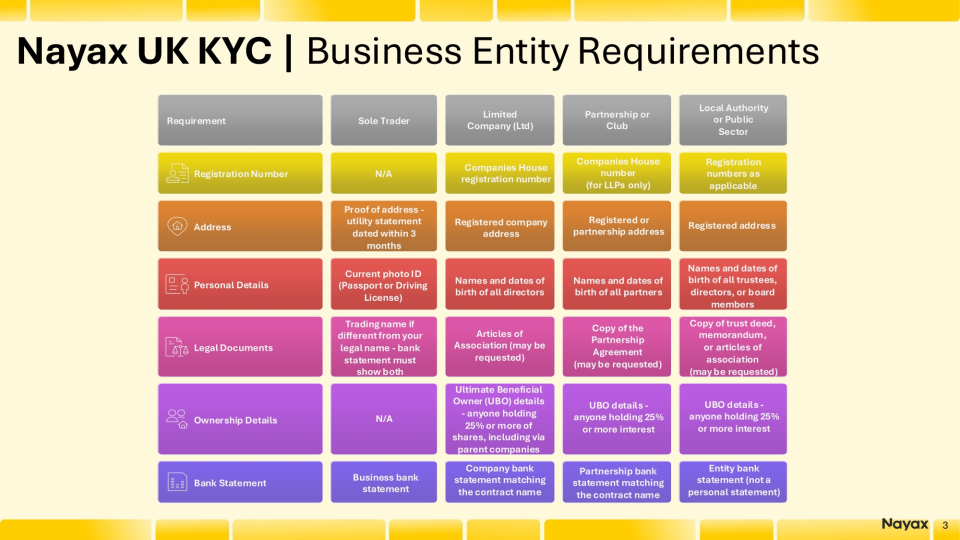
00:38: In addition to the documents required from all entities,
00:41: Nayax requires specific information depending on your business structure.
00:45: Select the type that applies to you.
00:48: Click the 'Learn More' link
00:49: to view a full explanation in Nayax U.
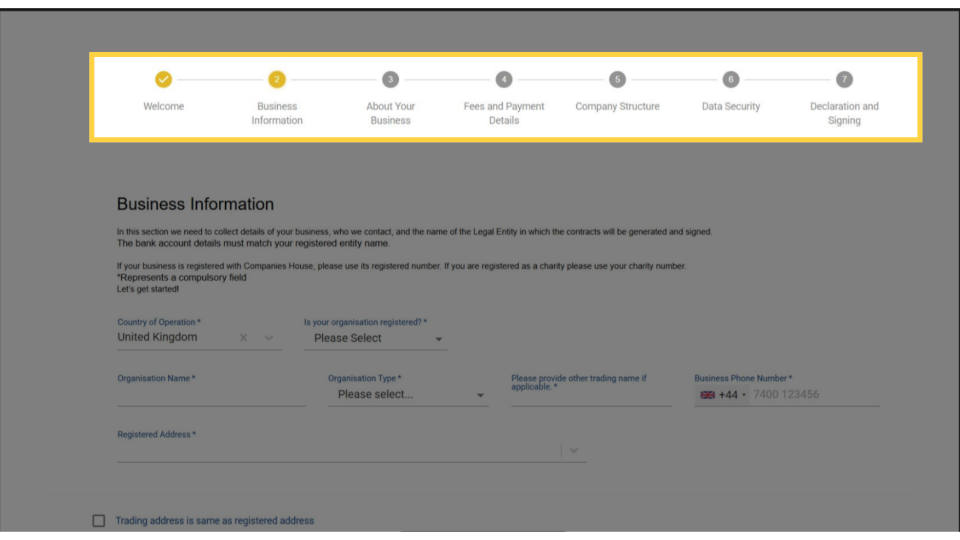
00:52: The form has seven steps:
00:54: Welcome, Business Information,
00:56: About Your Business,
00:58: Fees and Payment Details,
00:59: Company Structure, Data Security,
01:02: and Declaration and Signing.
01:04: Each step ends with a Save and Continue button.
01:07: This is the most detailed section;
01:09: take your time here, because the details you enter must match your official records
01:13: exactly.
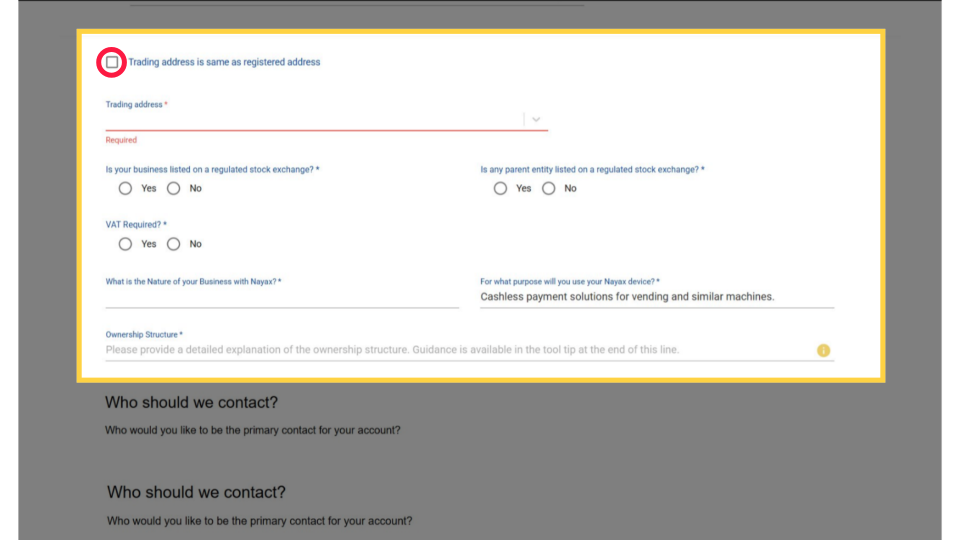
01:14: Add your Registered Address and your Trading Address.
01:17: If they're the same, just tick the checkbox and the form will fill it in for you.
01:21: Answer the questions,
01:23: but do so based on your own situation.
01:26: The Ownership Structure field is crucial.
01:28: Describe who owns and controls your business.
01:31: If it's just you, state that.
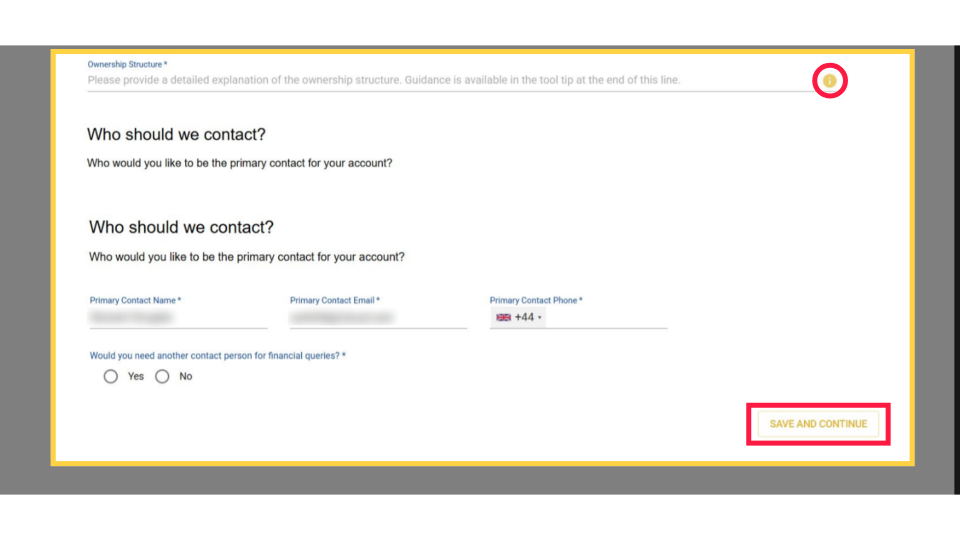
01:33: A help tooltip is highlighted in RED for guidance.
01:37: Once filled in, click Save and Continue.
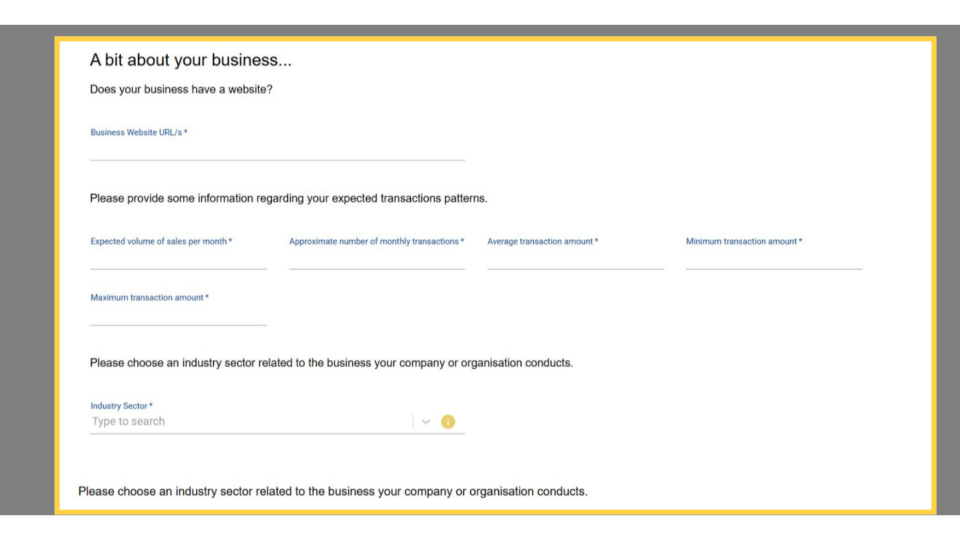
01:40: Describe your trading activity and transaction patterns.
01:43: Fill in expected monthly sales volume,
01:46: number of monthly transactions,
01:47: and average, minimum, and maximum transaction amounts.
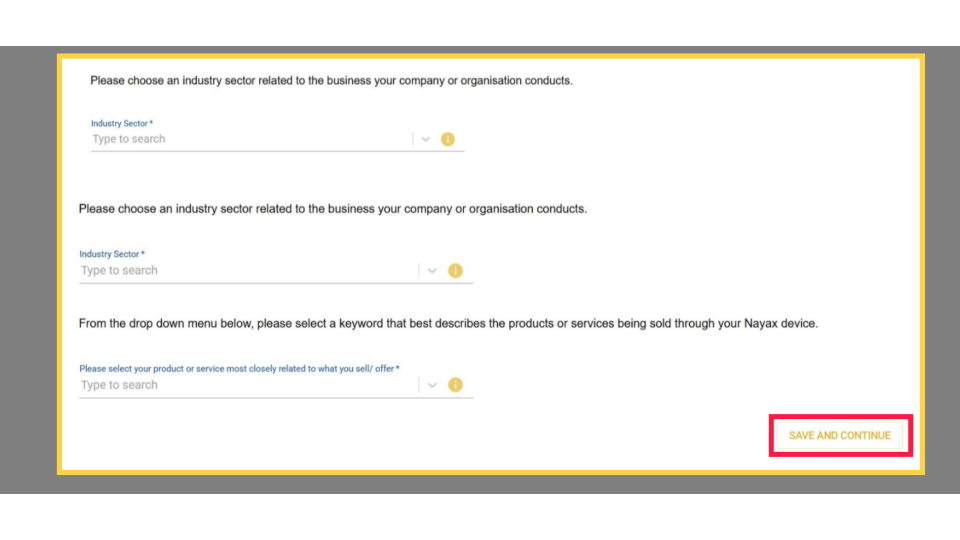
01:51: Select your Industry Sector
01:53: and choose the product or service that best describes what you sell
01:57: through your Nayax device.
01:59: Click Save and Continue.
02:01: Fees
02:02: and Payment
02:03: Details specify where Nayax sends reimbursements.
02:07: This must match your registered Organization Name
02:10: to avoid payment delays.
02:12: Upload Proof of Bank
02:13: showing your account name, number, and sort code.
02:17: Company Structure is required by UK Money Laundering Regulations,
02:21: so it can't be skipped.
02:22: Once all required individuals are added, click Save and Continue.
02:27: Data Security outlines the electronic signing process.
02:30: This step requires a liveness video,
02:33: a UK legal requirement.
02:35: Your camera will record a clip to confirm your identity, deleted within 24 hours.
02:40: If your computer lacks a webcam,
02:42: use your mobile for the final step before clicking Save and Continue.
02:47: Declaration and signing are the final steps.
02:50: Review your Fee Agreement Form for the correct business name, address, and fee rates.
02:55: A message will indicate if a required field is missing.
02:58: Click Take Me There to jump to the missing fields.
03:01: Once you've signed, the Nayax UK compliance team will review your application.
03:07: When your account is approved,
03:08: you'll receive an email confirmation,
03:10: and your devices will be ready to process payments.
03:14: If you have any questions during the review period,
03:16: email the Nayax UK team.
Prerequisites: Before You Start
Image Attached- 1. You have received your Nayax UK & Ireland onboarding email with a link to the agreement form.
2. You have your Companies House registration number or charity number ready.
3. You know your company's Ultimate Beneficial Owners, anyone who owns or controls 25% or more of your business.
4. You have your bank account details to hand: account name, account number, bank name, sort code, and a proof of bank document.
5. You have a device with a working webcam or camera. You need this for the electronic signing step. Without a camera, you cannot complete the form.
6. You have your passport or identity card available for the liveness check at the signing step.
Additional Requirements by Business Type
Image AttachedIn addition to the documents required from all entities, Nayax requires specific information depending on your business structure.
Form Overview
Image AttachedThe Nayax UK onboarding agreement is a seven-step wizard.
Step 1: Welcome is informational. Several steps require you to enter information and upload documents. The wizard shows your progress at the top of every page.
Business Information
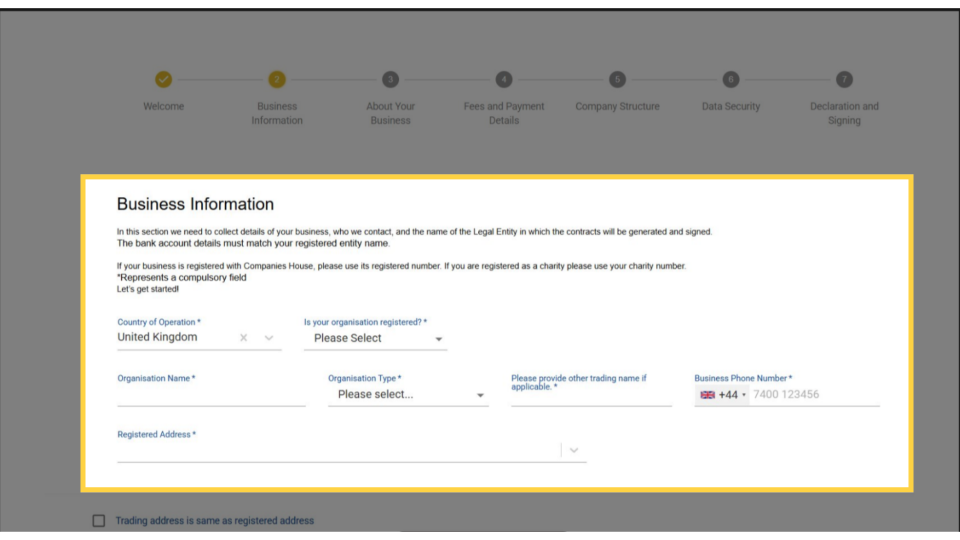
Image AttachedThis step collects your legal business details and primary contact. The bank account you add later must match the registered entity name you enter here.
Your business details
| Field | What to enter |
|---|---|
| Country of Operation | Pre-filled as United Kingdom. Do not change this. |
| Is your organisation registered? | Select Yes if registered at Companies House or as a charity. Select No if you are a sole trader not formally registered. Required |
| Organisation Name | Your full legal registered name — exactly as it appears at Companies House. Required |
| Organisation Type | Select from the drop-down: Sole Trader, Partnership, Limited Company, Charity, or other. Required |
| Other trading name | The name your business trades under if different from the registered name. Optional |
| Business Phone Number | UK business number including +44 country code. Required |
| Registered Address | Your Companies House registered address. Required |
| Trading address | The address where you operate. Tick Trading address is same as registered address if they match. Required |
| Is your business listed on a regulated stock exchange? | Select Yes or No. Required |
| Is any parent entity listed on a regulated stock exchange? | Select Yes or No. Required |
| VAT Required? | Select Yes if your business is VAT-registered. Required |
| Nature of Business with Nayax | Describe what your business does — for example, vending machine operation, unattended retail. Required |
| Purpose of Nayax device | Pre-filled with "Cashless payment solutions for vending and similar machines." Update if your use differs. Required |
| Ownership Structure | A written description of who owns and controls your business. If the structure is simple (one owner), state that clearly. A guidance tooltip is available on the form. Required |
Trading Address
Image AttachedAdd your Registered Address and your Trading Address. If they're the same, just tick the checkbox and the form will fill it in for you. Answer the questions, but do so based on your own situation.
Ownership Structure
Image Attached-
Field What to enter Primary Contact Name The main person Nayax UK should contact for account queries. Required Primary Contact Email Business email address for the primary contact. Required Primary Contact Phone Direct phone number including +44. Required Additional financial contact? Select Yes if a different person should receive billing and finance queries. You will be asked for their details. Required -
1
Complete all required fields in the Business Information section.
-
2
Complete the Who should we contact? section with your primary contact details.
-
3
Click Save and Continue to proceed to Step 3.
✅What you should see:The wizard advances and Step 2 shows as complete in the progress bar at the top.
About Your Business
Image AttachedThis step collects your trading activity and industry classification. Nayax uses this information for financial risk assessment and regulatory compliance.
| Field | What to enter |
|---|---|
| Business Website URL/s | Your company website address. If you do not have one, enter N/A. Required |
| Expected volume of sales per month | Estimated total monthly sales value in GBP. Required |
| Approximate number of monthly transactions | Estimated number of individual transactions per month across all devices. Required |
| Average transaction amount | Typical amount per individual transaction in GBP. Required |
| Minimum transaction amount | The lowest amount a single transaction could be. Required |
| Maximum transaction amount | The highest amount a single transaction could be. Required |
| Industry Sector | Type to search and select your primary industry sector. Required |
| Product or service sold | Select the keyword that best describes what you sell through your Nayax device. Required |
-
Complete all fields and click Save and Continue.
About Industry Sector
Image AttachedSelect your Industry Sector and choose the product or service that best describes what you sell through your Nayax device. Click Save and Continue.
| Field | What to enter |
|---|---|
| Industry Sector | Type to search and select your primary industry sector. Required |
| Product or service sold | Select the keyword that best describes what you sell through your Nayax device. Required |
Fees and Payment Details
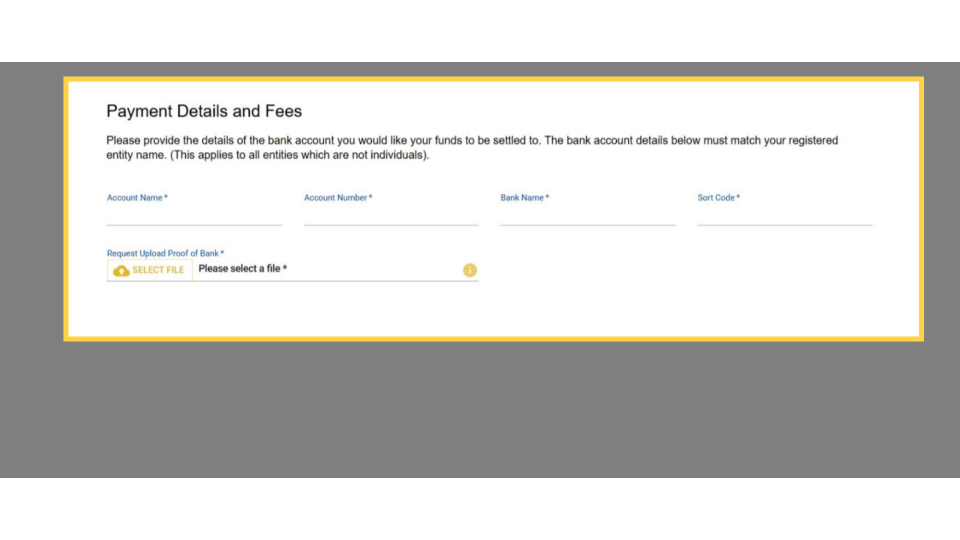
Image AttachedThis is where you enter the bank account that Nayax UK will use to pay your reimbursements. The account details must exactly match your registered entity name — the same name you entered in Step 2.
| Field | What to enter |
|---|---|
| Account Name | The name on your bank account. Must match your Organisation Name from Step 2 exactly. Required |
| Account Number | Your 8-digit UK bank account number. Required |
| Bank Name | The name of your bank — for example, Barclays, HSBC, Lloyds. Required |
| Sort Code | Your 6-digit bank sort code. Required |
| Proof of Bank | Upload a bank statement, voided cheque, or a bank letter confirming your account details. The document must show your account name, number, and sort code. Required |
-
1
Enter your bank account details in each field.
-
2
Click Select File next to Request Upload Proof of Bank and upload your document.
- Accepted formats: PDF, JPG, PNG. The document must be dated within the last 3 months.
-
3
Click Save and Continue.
Company Structure
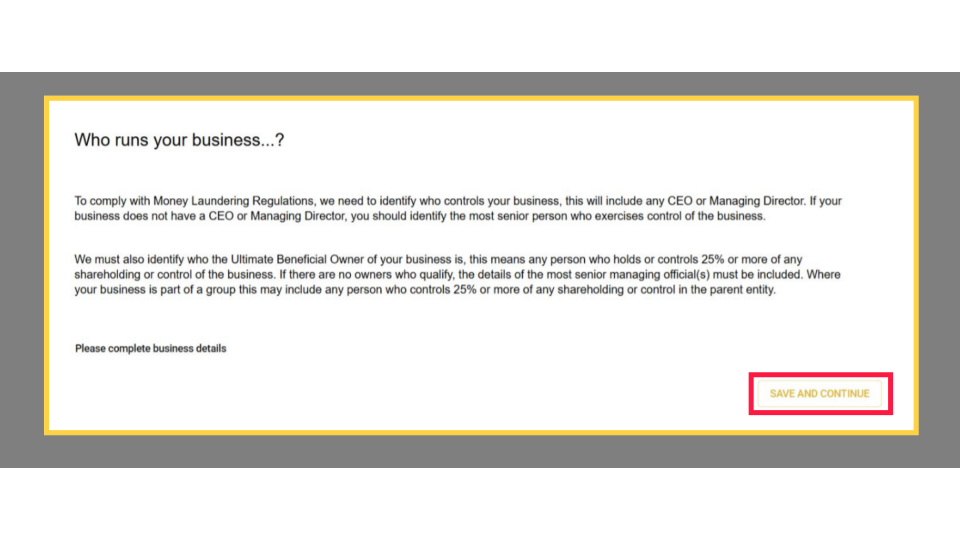
Image AttachedThis step identifies who controls and owns your business. It is required under UK Money Laundering Regulations and must be completed for every application.
• Every Ultimate Beneficial Owner (UBO) - any individual who owns or controls 25% or more of any shareholding or control of the business.
• If your business is part of a group, include anyone who controls 25% or more of the parent entity.
• If no individual owns 25% or more, provide details of the most senior managing official.
-
1
Click Please complete business details to open the company structure form.
-
2
Add the details for each person who meets the criteria above: full name, date of birth, nationality, residential address, and percentage of ownership or control.
-
3
Click Save and Continue once all required individuals are added.
Data Security
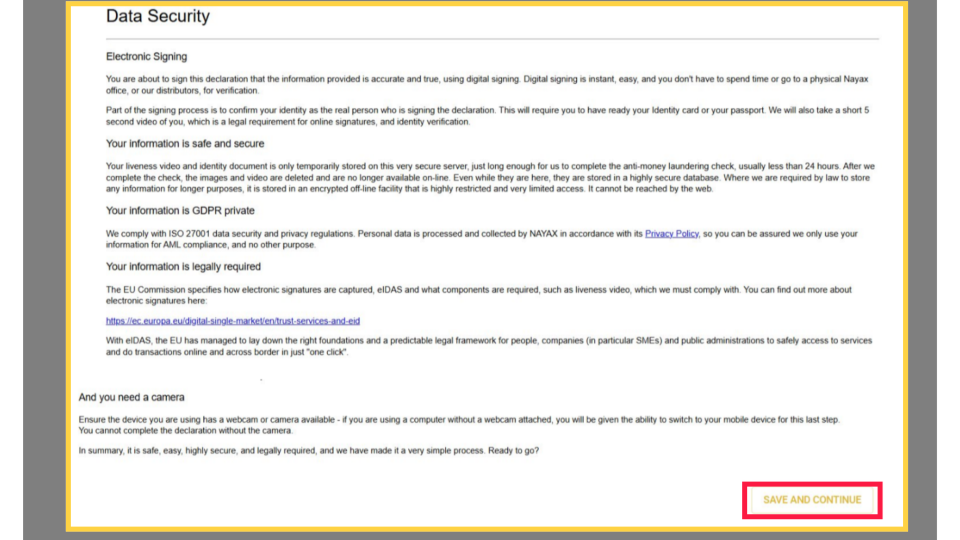
Image AttachedThis step explains the electronic signing process and how Nayax handles your personal data. Read it carefully before proceeding. The signing step requires a working camera and your identity document.
What happens during signing
| What is collected | Why is it collected | How long is it kept |
|---|---|---|
| Liveness video (short clip) | Confirms you are a real person signing the declaration in real time. Required by eIDAS for qualified electronic signatures. | Deleted after the AML check is complete - typically less than 24 hours. |
| Identity document image | Verifies your identity against the video. Your passport or national identity card. | Deleted after the AML check is complete. |
-
1
Read the Data Security information on screen.
-
2
Confirm your device has a working webcam or camera. If you are on a desktop without a webcam, switch to your mobile device now before proceeding.
-
3
Have your passport or identity card within reach. You will need it in the next step.
-
4
Click Save and Continue to proceed to the signing step.
Declaration and Signing
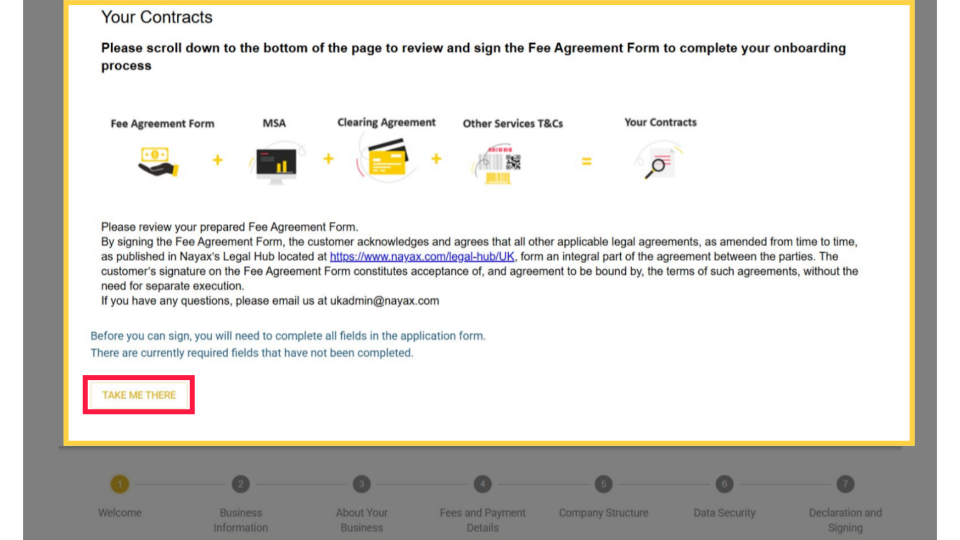
Image AttachedThe final step generates your contract and collects your digital signature. By signing the Fee Agreement Form, you agree to all applicable Nayax legal agreements published at nayax.com/legal-hub/UK.
Your contract is made up of four documents
-
1
Scroll down to review your Fee Agreement Form. Check that your business name, address, and fee rates are correct.
-
2
When you are ready, follow the on-screen prompts to complete the identity verification:
- Hold your passport or identity card up to the camera when prompted.
- Follow the liveness check instructions; you may be asked to turn your head or blink.
- The verification is complete in seconds.
-
3
Apply your digital signature to complete the agreement.
✅What you should see:A confirmation screen appears and a copy of your signed contract is sent to your registered email address.
What's Next?
Image AttachedThe Nayax UK compliance team will review your application. Once approved, your account is activated, and your devices can begin processing payments. Check your email for a confirmation and keep your signed contract for your records. For questions during the review period, email [email protected].
Thank you!
Did you find this article helpful?